Chapter 1.4 - Describe the basic structure of C program


BASIC STRUCTURES OF C PROGRAMS

The examples discussed so far illustrate that a C program can be viewed as a group of building blocks called functions. A function subroutine that may include one or more statements designed to perform a specific task.


 explain basic structure of C program

To write a C program, we first create functions and then put them together. A C program may contain one or more sections as shown in Fig. 9.


Describe the basic structure of C program #allaboutprogramming62
Fig. 9 An overview of a C program


Documentation Section  - 

The documentation section consists of a set of comment lines giving the name o program, the author and other details, which the programmer would like to use later.
Link Section  - 

The link section provides instructions to the compiler to link function from the system library

Definition Section  - 

The definition section defines all symbolic constants

Global Declaration Section  - 

There are some variables that are used in more than one function. Such variables are called global variables and are declared in the global declaration section that is outside of all functions. This section also declares all the user-defined functions.

main() Function Section  - 

Every C programs must have one main() function section. This section contains two parts, declaration part, an executable part. The declaration part declares all the variable used in the executable part, There is at least one statement in executable part. These two parts must appear between the opening and the closing braces. The program executation brgins at the opening brace and ends at the closing brace. The closing brace of the main fumction section is the logical end of progtam. All statements in the declaration and executable parts end with a semicolon (;).  


Subprogram Section  - 

The subprogram section contains all the user-defined function that is called in the main function. User-defined are generally placed immediately after the main function, although they may appear in any order. #allaboutprogramming62


Note - All Sections, expect the main function section may be absent when they are not required.

Chapter 1.3 - Illustrate the use of user-defined functions and math functions through sample programs | Part - 2


SAMPE PROGRAM 5 - USE OF MATH FUNCTIONS

We often use standard mathematical functions such as cos, sin, exp, etc. We shall see how the use of a mathematical function in the program. The standard mathematical functions are defined and kept as a part of the C math library.

    Chapter 1 - History Of C Programming Language

    Download Let us 'C' [pdf] E-BOOK


use of  math functions through sample programs  #allaboutprogramming62


If we want to use any of these mathematical functions, we must add an #include instructions in the program. Like #define, it is also a compiler directive that instructs the compiler to link the specified mathematical functions from the library. The instruction is of the form

#include<math.h>


math.h is the filename containing the required function. Fig. 8 illustrates the use of the cosine function. The program calculates cosine values for angles 0, 10, 20.....180 and prints out the result with headings. 

The program is using math functions
Fig. 8 Program using a math function

Output 
The program is using math functions
Fig. 8 Program using a math function

Another #include instruction that is often required is
#include<stdio.h>
stdio.h refers to the standard O/P input and output functions.


                     Download Turbo C++ Program Compiler


The #include Directive

As mentioned earlier, C programs are divided into modules or functions. Some functions are written by users, like us, and many others are stored in the C library. Library functions are groped by category-wise and stored in different files known as header files. If we want to access the functions stored in the library, it is necessary to tell the compiler about the files to be accessed. This is achieved by using the preprocessor directive #include as follows.                      #include<file name>
the filename is the same of the library file that contains the required function definition. Preprocessor directives are placed at the beginning of a program #allaboutprogramming62.

Chapter 1.3 - Illustrate the use of user-defined functions and math functions through sample programs | Part - 1


SAMPLE PROGRAM 4: USE OF SUBROUTINES

So far, we have used only printf function that has been provided for us by the C system. The program is shown in Fig. 7 uses a user-defined function. A function defined by the user is equivalent to a subroutine in FORTRAN or subprogram in BASIC. 

      Chapter 1 - History of C Programming Language

      Chapter 1.1 - Produce an overview of C Programming  


Chapter 1.3 - Illustrate the use of user-defined functions and math functions through sample programs | Part - 1

Fig. 7 present a very simple program that uses a mul() function. The program will print the following output. 

           Download Let us C E-BOOK | Yashwant Kanetkar 

           Download Turbo C++ Program Compiler 

Multiplication of 5 and 10 is 50

a program using a user-defined function
Fig. 7 A program using a user-defined function

The mul() function multiplies the value of x & y and the result is returned to the main() function when it is called in the statement
                                                    c = mul(a,b);

Chapter 1.2 - Exemplify the elementary C concept through sample Programs

PART - 1
PART - 2
PART - 3


The mul() has two arguments x and y that are declared as an integer. The values of a and b are passed on to x and y respectively when the function mul() is called. User-defined functions are considered in detail in another our post #allaboutprogramming62.

Chapter 1.2 - Exemplify the elementary C concept through sample programs | Part - 3


SAMPLE PROGRAM OF 3 - INTEREST CALCULATION


sample program of interest calculation

The program in Fig. 5 calculates the value of money at the end of each year of investment, assuming an interest rate of 11 percent and prints the year, and the corresponding amount, in two columns. The output is shown in Fig. 6 for a period of 10 years with an initial investment of 5000.00. The program uses the following formula. 


Value at the end of the year = Value at the start of the year (1 + interest rate) 
In the program, the variable value represents the value of money at the end of the year while the amount represents the value of money at the start of the year. The statement 
                                           amount = value;  

makes the value at the end of the current years as the value start of the next year.


C concept through sample programs
Fig. 5 Program For Investment Problem 

Let us consider the new features introduced in this program. The 5 and 6 lines begin with #define instructions. A #define instruction defines value to a symbolic constant for use in the program. Whenever a symbolic name is encountered, the compiler substitutes the value associated with the name automatically. To change the value, we have to simply change the definition. In this example, we have defined two symbolic constant PERIOD and PRINCIPAL and assigned values 10 and 5000.00 respectively. These values remain constant throughout the execution of the program. 

Program For Investment Problem
Fig. 6 Output of the investment program

The #define Directive

A #define is a preprocessor compiler directive and not a statement. Therefore #define lines should not end with a semicolon. A symbolic constant is generally written in uppercase so that they are easily distinguished from lowercase variable names. #define instructions are usually placed at the beginning before the main() function. A symbolic constant is not declared in the declaration section.

We must note that the defined constants are not variables. We may not change their values within the program by the assignment statement. For example, the statement
                                          PRINCIPLE = 10000.00;

The declaration section declares years as integer and amount, value and inrate as floating point numbers. Note all the floating-point variables are declared in one statement. They can also be declared as 
                                                         float  amount;                                                                                                              float  value;                                                                                                                    float   inrate;

When two or more variables are declared in one statement, they are separated by a comma.


All computations and printing are accomplished in a while loop. while is a mechanism for evaluating repeatedly a statement or a group statements. In this case, as long as the value of year is less than or equal to the value of PERIOD, the four statement that follows while being executed. Note that these four statements are grouped by braces. We exit the loop when the year becomes greater than PERIOD
C supports the basic four arithmetic operators (*,/,+,-) along with serval other. 

Chapter 1.2 - Exemplify the elementary C concepts through sample programs | Part 2


SAMPLE PROGRAM 2: ADDING TWO NUMBERS

                 Chapter 1 - History of C Programming


C concepts through sample programs


Consider another program. Which performs addition on two numbers and displays the result. The complete program is shown above fig.

Addition of two numbers sample program
Fig 4 - Program to add two numbers 
This program when executed will produce the following output. 
                                    100
                                    106.10
The first 4 & 5 lines of the program are comment lines. It is good practice to use comment lines in the beginning to give information such as the name of the program, author, date, etc. Comment characters are also used in other lines to indicate line numbers. 


The words number and amount are variable names that are used to store numeric data. The numeric data may be either in an integer form or in real form. In C, all variables should be declared to tell the compiler what the variables name are and what type of data they hold. The variable must be declared before they are used. In lines 10and 11, the declarations. 
                                     int number;                                                                                                                  float amount;

tell the compiler that number is an integer (int) and the amount is floating (float) point number. Declaration statement must appear at the beginning of function as shown in Fig - 4. All Declaration statements end with a semicolon; C supports many other data types and they are discussed in detail in our Next Chapter. 
The words such as int and float are called the keyword and cannot be used as variable names


Data is stored in a variable by assigning a data value to it. This is done in lines 14 & 16. In line-14, an integer value 100 is assigned to the integer variable number and in line-16, the result of adding two real numbers 30.75 and 75.35 is assigned to the floating point variable amount. The statements 
                                                number = 100;                                                                                                             amount = 30.75 + 75.35;
are called the assignment statements. Every assignment statement must have a semicolon at the end. 
The next statement is an output statement that prints the value of a number. The print statement
                                   printf("%d\n", numbers);  


contains two arguments. The first argument "%d" tells the compiler that the value of the second argument number should be printed as a decimal integer. Note that these arguments are separated by a comma. 
The newline character \n causes the next output to appear on a new line.
The last statement of the program

                                     printf("5.2f", amount);
prints out the value of the amount in floating point format. The format specification %5.2f tells the compiler that the output must be in floating point, with five places in all and two places to the right of the decimal point.

Chapter 1.2 Exemplify the elementary C concepts through sample programs | Part - 1


SAMPLE PROGRAM 1: PRINTING A MESSAGE


C language tutorials for beginners

The above example is the Syntax of C Programming. The highlights the general syntax/format of such simple programs. All C programs need a least one function they are the main function.
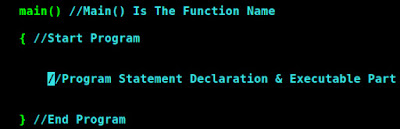
Sample Program Of Printing A Message
Fig - 2 Syntax Of C Programming

The main Function 

The main is a part of every C program. C permits different forms of the main statement. Following forms are allowed. 
  • main()
  • int main()
  • void main()
  • main(void)
  • void main(void)
  • int main(void)


The empty pair of parentheses indicates that the function has no arguments. This may be explicitly indicated by using the keyword void insides the parentheses. We may also specify the keyword int or void before the word main. The keyword void means that the function does not return any information to the operating systems and int means that the function returns an "integer value" to the operating system. When an int is specified, the last statement in the program must be "return 0". For the sake of simplicity, we use the first form in our programs.  


Consider a very simple program given in above fig

print line using C
Fig - 3 A Program to print one line of text

This program when executed will produce the following output.
I want, I need
Let us have a close look at the program. The first line informs the system that the name of the program is main and the execution begins at this line. The main() is a special function used by the C system to tell the computer where the program starts. Every program must have exactly one main function. If we use more than one main function, the compiler cannot understand which one marks the beginning of the program. 


The empty pair of parentheses immediately following main indicates that the function main has no arguments (or parameters). The concept of arguments will be discussed in detail later when we discuss function (in a chapter of Function).
The opening brace "{" in the second line marks the begging of the function main and the closing brace "}" in the last line indicates the end of the function. In this case, the closing brace also marks the end of the program. All the statements between these two braces from the function body. The function body contains a set of instructions to perform the given task.


In this case, the function body contains three statements out of which only the printf line is an executable statement. The lines beginning with /* are known as comment lines. These are used in a program to enhance its readability and understanding. Comments lines are not executable statements and therefore anything between /* and */  is ignored by the compiler. In general, a comment can be inserted wherever blank spaces can occur at the beginning, middle or end of a line-"but never in the middle of the word".
Although comments can appear anywhere, they cannot be nested in C. That means, we cannot have comments inside comments. Once the compiler finds an opening token, it ignores everything until it finds a closing token. The comment line.
/*======/*=====*/=====*/
is not valid and therefore result in an error. 
Since comments do not affect the execution speed and the size of the compiled program, we should use them liberally in our programs. They help the programmers and others users in understanding the various functions and operations of a program and serve as an aid to debugging and testing. We shall see the use of comment lines more in the examples that follow.
Let us now look at the printf() function, the only executable statement of the program.
 printf("I want, I need");
printf is a predefined standard C function for priting output. Predefined means that it is a function that has already been written and compiled, and linked together with our program at the time of linking. The concept of compilation and linking are explained later in this post. The printf function causes everything between the starting and ending quotation marks to be printed out. In this case, the output will be: 
I want, I need
Note that the print line ends with a semicolon. Every statement in C should end with a semicolon (;) mark.
Suppose we want to print the above quotation in two lines as.
I want,I need!
This can be achieved by adding another printf function as shown below: 
printf("I want, \n");
   printf("I need!");  
  
The information contained between the parentheses is called the argument the function. This argument of the first printf function is "I want, \n" and the second is "I need!". These arguments are simply strings of characters to be printed out.

It is also possible to produce two or more lines of output by one printf statement with the use of newline character at appropriate places. For example the statement.

printf("I want, \n I need!");

Will Output -: I want,
                                I need!

While the statement -:  printf("I.. want,\n ... ... ... I\n... ... ... need!");

Will print out     I               
                        .. want
                           ... ... ... I 
                                  ... ... ... need!

Note -: Some Authors recommend the inclusion of the statement.
#include<stdio.h> 

At the beginning of all programs that use any input/output library functions. However, this is not necessary for the functions printf and scanf  which have been defined as a part of the C language.


Before we proceed to discuss further examples, we must note one important point. C does make a distinction between uppercase & lowercase. For example, scanf and SCANF are not the same In C, everything is written in lowercase letters.  

Chapter 1.1 Produce an overview of C Programming Language


IMPORTANCE OF C - ANSI C

The increasing popularity of C is probably due to its many desirable qualities. It is a robust language whose rich set of built-in functions and operators can be used to write any complex program. The compiler combines the capabilities of an assembly language with the features of the high-level language and therefore it is well suited for writing both system software and business packages. In fact, many of the C compilers available in the market are written in C.

C language Tutorials for beginners english/hindi
IMPORTANCE OF C

Programs written in C are efficient and fast. This is due to a variety of data types and powerful operators. It is many times faster than BASIC. For example, a program to increment a variable from 0 to 20000 takes about one second in C while it takes more than 50 seconds in an interpreter BASIC.


There are only 32 keywords in ANSI C and its strength lies in its built-in functions. Serval standard functions are available which can be used for developing a program.
C is highly portable. This means that C programs written for one computer can be run on another with little or no modification. Portability is important if we plan to use a new computer with a different operating system.

C language is well suited for structured programming, thus requiring the user to think of a problem in terms of functional modules or blocks. A proper collection of these modules would make a complete program. This modular structure makes program debugging, testing and maintenance easier.
Another important feature of C is its ability to extend itself. A C program is basically a collection of functions that are supported by the C library.  We can continuously add our own functions to C library. With the availability of a large number of functions, the programming task becomes simple.


Before discussing specific features of C, we shall look at some sample C programs, and analyze and understand how they work.


New To This Edition  

Distinguished as one of the bestsellers in the market, this revised edition of 'Programming In ANSI C' is now a Hybrid print book which has been designed for enhanced higher learning. This seventh edition is thoroughly updated with outcomes-based learning approach as per standard 'Bloom's Taxonomy'. The new additions are important content like "Graphic Programming using C", and introduction to C11.    

Chapter 1 Overview Of C Programming - Brief History Of C Language


HISTORY OF C & ANSI C

C LANGUAGE TUTORIAL FOR BEGINNERS

'C' seems a strange name of a programming. But this is strange sounding language is one of the most popular computer programming language today because it is a high-level, machine-independent & structured language. It allows software developer to develop program without worrying about the hardware platform where they will be implemented. 

HISTORY OF ANSI C
FIG 1 - HISTORY OF ANSI C

ALGOL 1960

  • The root of all modern languages is ALGOL, introduced in the early 1960s.
  • ALGOL was the first computer language to use a block structure.
  • It is never becoming popular in USA, it was widely used in EUROPE. 
  • ALGOL gave the concept of structured programming to the IT community.
  • Computer scientists like Corrado Bohm, Guiseppe Jacopini & Edsger Dijkstra populizer this concept during 1960s. 

BCPL 1967 

  • In 1967, Martin Richards developed a language called BCPL (Basic Combined Programming Language) primary for writing software.

B Language 1970 

  • In 1970, KEN THOMPSON created a language using many features of BCPL & called it simply B.
  • B was used to create early versions of Unix Operating System at Bell Laboratories.
  • Both BCPL & B where "typeless" system programming languages.

Traditional C 1972 

  • C was envolved from ALGOL, BCPL & B by Denis Ritchie at the Bell Laboratories in 1972. C uses many concepts from these languages & added the concepts of Data Types & other Powerful Features. Since it was developed along with the Unix Operating System, it is strongly associated with Unix.
  • This operating system, which was also developed at Bell Laboratories, was coded almost entirely in C. Unix is the one of the most popular network operating system in use today and the heart of the internet data superhighway.
  •  For many years, C was used mainly academic environments, but eventually, with the release of many C compilers for commercial use and the increasing popularity of UNIX, it began to again widespread support among computer professionals. 
  • Today, C is running under a variety of operating system and hardware platforms. During the 1970s,  C had evolved into what is known as "traditional C".

K&R C 1978

  • The language became more popular after the publication of the of the book 'The C Programming Langauge' by Brian Kerningham & Denis Ritchie in 1978. The book was so popular that the language came to be known as "K&R C" among the programming community.
  • The rapid growth of C led to the development of different versions of the language that was similar but often incompatible. The posed a serious problem for system developers.  

ANSI C 1989

  • To assure that the C language remains standard, in 1983, American National Standards Institute (ANSI) appointed a technical committee to define a standard for C. 
  • The committee approved a version of  C in December 1989 which is now known as ANSI C. 

ANSI/ISO C 1990

  • It was then approved by the International Standard Organization (ISO) in 1990. This version of C also referred to as C89. 
  • During the 1990s, C++, a language entirely based on C, underwent a number of improvements and changes and became an ANSI/ISO approved language in November 1977. C++ added serval new features to C to make it only a true object-oriented language but also more versatile language. During the same period, Sun Microsystems of USA created a new language JAVA modeled on C and C++.

C99 1999

  • All popular computer languages are dynamic in nature. They continue to improve their power and scope by incorporating new features and C is no exception. Although C++ and Java were evolved out of C, the standardization committee of C felt that a new feature of C++/Java, if added to C, would enhanced the usefulness of the language. The result was the 1999 standard for C. This version usually referred to as C99. The history of the development of C is illustrated in FIG - 1. 
  • Although C99 is an improved version, still many commonly available compilers do not support all of the new features incorporated in C99. We, therefore, discuss all the new features added by C99 in an appendix separately so that readers who are interested can quickly refer to the new material and use them wherever possible.

Preface to the Seventh Edition

C is a powerful, flexible, portable and elegantly structured programming language. Since C combines the features of a high-level language with the elements of the assembler, it is suitable for both systems and applications programming. It is undoubtedly the most widely used general-purpose language today in operating systems and embedded system development. It's an influence is evident in almost all modern programming languages. Since its standardization in 1989, C has undergone a series of changes and improvement in order to enhance the usefulness of the language. The version that incorporates the new features is now referred to as C11.

Comments System

blogger/disqus/facebook