Chapter 2.4 - Discuss how variables are used in a program | Part -1


DECLARATION OF VARIABLES

After designing suitable variables names, we must declare them to the compiler.
The declaration does two things:
  1. It tells the compiler what the variable name is.
  2. It specifies what type of data the variable will hold.
The declare of variables must be done before they are used in the program.

     C language tutorials for beginners

    Download Let us C eBook | by Yashwant Kanetkar

DECLARATION OF VARIABLES


Primary Type Declaration

A variable can be used to store a value of any data type. That is, the name has nothing to do with its type. The syntax  of declaring a variable is as follows:

data-type v1,v2,....vn
v1,v2,...vn are the names of variables. Variables are separated by commas. A declaration statement must end with a semicolon. For example, valid declarations are:

int count;            
int number, total;
double ratio;       


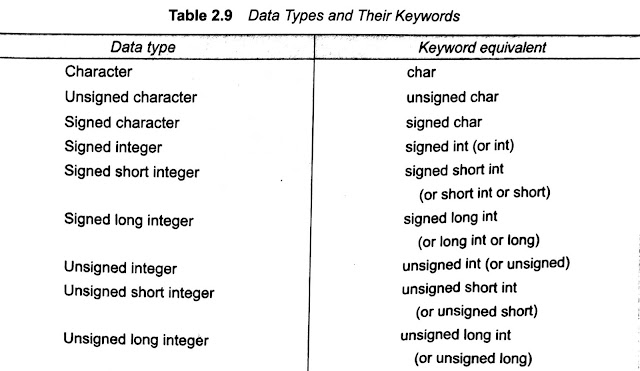
int and double are the keywords to represent integer type and real type data values respectively. Table 2.9 shows various data types and their keywords equivalents. #variables_in_c
Discuss how variables are used in a program | Part -1, What is a variable in computer programming, Computer Programming Variables, C variable with examples, attributes of a variable in programming.
Discuss how variables are used in a program | Part -1, What is a variable in computer programming, Computer Programming Variables, C variable with examples, attributes of a variable in programming.  


The program segment given in Fig 2.7 illustrates the declaration of variables. main() is the beginning of the program. The opening brace { single the execution of the program. Declaration of variables is usually done immediately after the opening brace of the program. The variables can also be declared outside (either before or after) the main function. The importance of the place of the declaration will be dealt with in detail later while discussing functions. #allaboutprogramming62


Note-: C99 permits declaration of variables at any point within  a function or block, prior to their use

Discuss how variables are used in a program | Part -1, What is a variable in computer programming, Computer Programming Variables, C variable with examples, attributes of a variable in programming.

When an adjective (qualifier) short, long, or unsigned is used without a basic data type specifier, C compilers treat the data types as an int. If we want to declare a character variable as unsigned, then we must do so using both the terms like unsigned char


Default values of Constants 

Integer constants, by default, represent int type data. We can override this default by specifying unsigned or long after the number (by appending U or L) as shown below:

Literal                             Type                                      Value

+111                                int                                           111
-222                                 int                                           -222
45678U                           unsigned int                           45678
-56789L                           long int                                  -56789
987654UL                       unsigned long int                   987654


Similarly, floating point constants, by default represent double type data. If we want the resulting data type to be float or long double, we must append the letter f or F to the number for float and letter l or L long for long double as shown below:


Literal                             Type                                      Value

0.                                     double                                     0.0
-222                                 double                                     0.0
45678U                           double                                     12.0
-56789L                          double                                     1.234
987654UL                       float                                       -1.2
1.23456789L                   long double                          1.23456789


           Top 10 Useful Basic Commands for Linux Users

           C Pattern Programming Example Tutorial 


Chapter 2.3 - Identify the various C data types | Part -1


DATA TYPES

C language is rich in its data types. Storage representations and machine instructions to handle constants differ from machine to machine. The variety of data types available allow the programmer to select the types appropriate to the needs of the applications as well as the machine.
ANSI C supports three classes of data types:

  1. Primary (or fundamental) data types
  2. Derived data types
  3. User-defined data types
The primary data types and their extensions are discussed in this section. The user-defined data types are defined in the next section while the derived data types such as arrays, functions, structures, and pointers are discussed as and when they are encountered.


All C compilers support five fundamental data types, namely integer (int),  character (char), floating point (float), double-precision (double) and void. Many of them also offer extended data types such as long int and log variable. Various data types and the terminology used to describe them are given in Fig 2.4. The range of the basic four types is given in Table 2.7. We discuss briefly each one of them in this section #allaboutprogramming62.


Note:- C99 adds three more data types namely_Bool_Complex, &_Imaginary. See the Appendix "C99 Features"

Various C data types


Primary Data Types #allaboutprogramming62

Chapter 1.6 - Recognize the programming style of C language | Part - 3


Creating Your Own Executable File

Read first the previous two part of this post Part -1 & Part - 2 after reading of this two-part, then you can be understood of the following part - 3. 


Chapter 1.6 - Recognize the programming style of C language | Part - 3

Note that the linker always assigns the same name a.out. When we compile another program, this file will be overwritten by the executable object code of the new program. If we want to prevent from happening, we should rename the file immediately by using the command
                         mv a.out name
We may also achieve this by specifying an option in the cc command as follows:


                         cc -o name source-file
This will store the executable object code in the file name and prevent the old file a.out from being destroyed.


Multiple Source File

To compile and link multiple source program files, we must append all the file names to the cc command.

                        ccfilename - 1.cfilename-n.c                
These files will be separately compiled into object files called
                                     filename-i.o
and then linked to produce an executable program file a.out as shown in Fig. 11

program executing steps
Fig. 11. Compilation of multiple files
It is also possible to compile each file separately and link them later. For example, the commands
                                cc -c mod1.c                                cc -c mod2.c
will compile the source file mod1.c and mod2.c into object files mod1.o and mod2.o. They can be linked together by the command


                               cc mod1.o mod2.o
we may also combine the source files and object files as follows:
                               cc mod1.c mod2.o
The only mod1.c is compiled and then linked with the object file mod2.o. This approach is useful when one of the multiple source files need to be changed and recompiled or an already existing object files is to be used along with the program to be compiled. 


MS-DOS SYSTEM

The program can be created using any word processing software in non-document mode. The file name should end with the characters ".c" like the program.c, pay.c, etc. Then the command under the MS-DOS operating system would load the program stored in the file pay.c and generate the object code. This code has stored another file under name pay.obj. In case any language errors are found, the compilation is not completed. The program should then be corrected and compiled again.


This linking is done by the command
                                          LINK pay.obj
which generates the executable code with the filename pay.exe. Now the command
                                                   pay
would execute the program and given the result. # allaboutprogramming62

Chapter 1.6 - Recognize the programming style of C language | Part - 2


Executing the C Program

Read first the previous part of this post PART -1. Execution is a simple task. The command

                                           a.out

would load the executable object code into the computer memory and execute the instructions. During execution, the program may request for some data to be entered through the keyboard. Sometimes the program does not produce the desired result. Perhaps, something is wrong with the program logic or data. Then it would be necessary to correct the source program or the data. In case the source program is modified, the entire process of compiling, linking and executing the program should be repeated. 


Recognize the programming style of C language


Creating Your Own Executable File

Note that the linker always assigns the same name a.out. When we compile another program, this file will be overwritten by the executable object code of the new program. If we want to prevent from happening, we should rename the file immediately by using the command.


                                                mv a.out name

We may also achieve this by specifying an option in the cc command as follows.


                                                cc -o name source-file


This will store the executable object code in the file name and prevent the old file a.out from being destroyed. #allaboutprogramming62

Chapter 1.6 - Recognize the programming style of C language | Part - 1


UNIX SYSTEM - Creating the program

Once we load the operating system into the memory, the computer is ready to receive the program. The program must be entered into the file. The file name can consist of letters, digits and special characters, followed by a dot and a letter C. Examples of valid file names are:

                               hello.c 
                               program.c
                               ebgl.c


The file is created with the help of a text editor, either ed or vi. The command for the calling editor and creating the file is
                               
                               ed filename 


If the file existed before, it is loaded. If the files do not exist, the file has to be created so that it is ready to receive the new program. Any correction in the program is done under the editor. (The name of your system's editor may be different. Check your system manual.)


When the editing is over, the file is saved on the disk. It can then be referenced any time later by its file name. The program, that is entered into the file is known as a source program since it represents the original form of a program. 

UNIX SYSTEM - Creating the program

Compiling and Linking 

Let us assume that the source program has been created in a file named ebg1.c. Now the program is ready for compilation. The compilation command to achieve this task under UNIX is

                                       cc ebgl.c


The source program instructions are now translated into a form that is suitable for execution by the computer. The translation is done after examining each instruction for its correctness. If everything is alright, the compilation proceeds silently and the translated program is stored on another file with the name ebg1.o. This program is known as object code.


Linking is the process of putting together other program files and functions that are required by the program. For example, if the program is using exp() function, then the object code of this function should be brought from the math library of the system and linked to the main program. Under UNIX, the linking is automatically done (if no errors are detected) when the cc command is used. 


      Solve Turbo C++ Common Issues             

If any mistakes in the syntax and semantics of the language are discovered, they are listed out and the compilation process ends right there. The errors should be corrected in the source program with the help of an editor and the compilation is done again. 


The compiled and the linked program is called the executable object code and it stored automatically in another file name a.out.
Note that some system uses different compilation command for linking mathematical functions. 
                               
                           cc filename - 1m

is the command under UNIPLUS SYSTEM V operating system. #allaboutprogramming62

Chapter 1.5 - Recognize the programming style of C language | Part - 2

EXECUTING A 'C' PROGRAM

Executing a program written in C involves a series of steps. These are:
  1. Creating the program:
  2. Compiling the program:
  3. Linking the program with functions that are needed from the C library; and
  4. Executing the program.
Chapter 1 - History of C language                                  


Recognize the programming style of C language


Fig. 10. illustrate the process of creating, compiling and executing a C program. Although these steps remain the same irrespective of the operating system, system commands for implementing the steps and conversion of naming files may differ on a different system.


      Turbo C++ Program Compiler Download                                

An operating system is a program that controls the entire operation of a computer system. All input/output operation is channeled through the operating system. The operating system which is an interface between the hardware and the user handles the execution of user programs. 

EXECUTING A 'C' PROGRAM
Fig. 10 Process of compiling & running a C program

          Fix common software Issues 


The two most popular operating system today is UNIX (for minicomputers) and MS-DOS (for microcomputers). We shall discuss briefly the procedure to be followed in executing a C program under both these operating system in the following sections in our next post. #allaboutprogramming62 

Chapter 1.5 - Recognize the Programming style of C language | Part -1

PROGRAMMING STYLE

Unlike some other programming languages (COBOL, FORTRAN, etc.,) C is a free-form_language. That is, the C compiler does not care, where on the line we begin typing. While this may be a license for bad programming. we should try to use this fact to our advantages in developing readable programs. although several alternatives styles are possible, we should select one style and use it with total consistency. 


Programming style of C language #allaboutprogramming62


First of all, we must develop the habit of writing a program in lowercase letters. C program statements are written in lowercase letters. Uppercase letters are used for an only symbolic constant.


Download Programming E-BOOK [pdf]                             

Braces, group program statements together and mark the beginning and the end of functions. A proper indentation of braces and statements would make a program easier to read and debug. Note how the braces are aligned and the statements are independent in the program of Fig. 5.

      a = b;              
            x = y + 1;              
            z = a + x;              

Can be written one line as

                                            a = b; x = y + 1;  z = a + x;

The program 

                                                               main()

                                                       {
                                                              printf("hello C");
                                                        }
May be written in one line like

                                             main() { printf ("Hello C"); }

However, this style makes the program more difficult to understand and should not be used. In this post, each statement is written on a separate line

    Download Turbo C++ Program Compiler                   


The generous use of comments inside a program cannot be overemphasized. Judiciously inserted comments not only increase the readability but also help to understand the program logic. This is very important for debugging and testing the program.   #allaboutprogramming62

Chapter 1.4 - Describe the basic structure of C program


BASIC STRUCTURES OF C PROGRAMS

The examples discussed so far illustrate that a C program can be viewed as a group of building blocks called functions. A function subroutine that may include one or more statements designed to perform a specific task.


 explain basic structure of C program

To write a C program, we first create functions and then put them together. A C program may contain one or more sections as shown in Fig. 9.


Describe the basic structure of C program #allaboutprogramming62
Fig. 9 An overview of a C program


Documentation Section  - 

The documentation section consists of a set of comment lines giving the name o program, the author and other details, which the programmer would like to use later.
Link Section  - 

The link section provides instructions to the compiler to link function from the system library

Definition Section  - 

The definition section defines all symbolic constants

Global Declaration Section  - 

There are some variables that are used in more than one function. Such variables are called global variables and are declared in the global declaration section that is outside of all functions. This section also declares all the user-defined functions.

main() Function Section  - 

Every C programs must have one main() function section. This section contains two parts, declaration part, an executable part. The declaration part declares all the variable used in the executable part, There is at least one statement in executable part. These two parts must appear between the opening and the closing braces. The program executation brgins at the opening brace and ends at the closing brace. The closing brace of the main fumction section is the logical end of progtam. All statements in the declaration and executable parts end with a semicolon (;).  


Subprogram Section  - 

The subprogram section contains all the user-defined function that is called in the main function. User-defined are generally placed immediately after the main function, although they may appear in any order. #allaboutprogramming62


Note - All Sections, expect the main function section may be absent when they are not required.

Comments System

blogger/disqus/facebook